WebWhizz Blog -
Expert Digital Insights.
Expert thoughts on design, technology, and digital growth strategies. No fluff, just value.
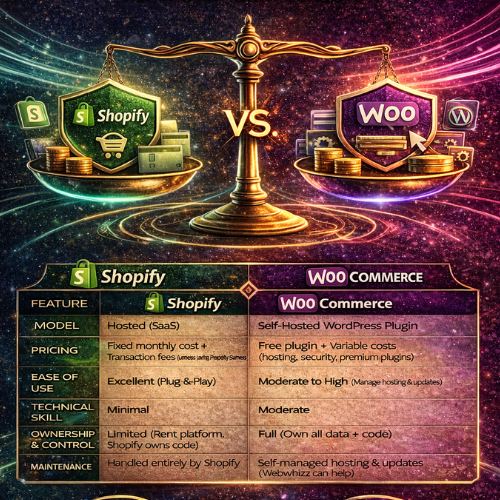
Shopify vs. WooCommerce Choosing the Right Engine for Your E-commerce Success
Launching an online store is exhilarating, but before you can start packing orders, you face the biggest decision: selecting the right platform. The e-commerce landscape is dominated by two giants, each offering a distinct path to digital success: Shopify and WooCommerce. The question isn't which platform is objectively "better," but which is the best fit for your unique vision, budget, and technical comfort level. At Webwhizz, we understand that this choice can be daunting. We specialize in building and optimizing professional e-commerce solutions, whether you prefer the managed ease of Shopify or the robust flexibility of WooCommerce. Our goal is to empower you with the facts so you can choose the engine that will truly propel your business forward. Let’s dive into a comprehensive comparison of Shopify and WooCommerce. A Snapshot Comparison For those short on time, here is a quick overview of the core differences between the two platforms: | Feature | Shopify | WooCommerce | | :--- | :--- | :--- | | Model | Hosted (SaaS – Software as a Service) | Self-Hosted (Open Source WordPress Plugin) | | Pricing | Fixed monthly subscription + Transaction fees (unless using Shopify Payments) | Free plugin + Variable costs (Hosting, Security, Premium Themes/Plugins) | | Ease of Use | Excellent. True plug-and-play setup. | Moderate to High. Requires management of hosting and software updates. | | Technical Skill | Minimal to none. | Moderate (Requires familiarity with WordPress and web hosting). | | Ownership/Control | Limited. You rent the software and platform. | Full. You own all your data and code. | | Maintenance | Handled entirely by Shopify. | Handled entirely by the store owner or developer (Webwhizz). | Deep Dive: Shopify – The All-in-One Solution Shopify is the reigning champion of simplicity. It operates on a Software-as-a-Service (SaaS) model, meaning it bundles everything you need—hosting, security, updates, and the platform software—into one monthly fee. It is built specifically for e-commerce, making the initial setup incredibly straightforward, often allowing merchants to launch their store in a single day. Pros and Cons of Shopify Shopify Advantages Exceptional User Experience: The dashboard is intuitive, and adding products, managing inventory, and fulfilling orders is streamlined. Zero Maintenance: Shopify handles all technical upkeep, security patches, and server maintenance. You only worry about sales. Integrated Payments (Shopify Payments): Using their proprietary payment system removes external transaction fees (though standard credit card processing fees still apply). Fantastic Support: 24/7 customer support is available via phone, email, and live chat. App Store: A massive ecosystem of well-vetted, paid, and free apps to extend functionality. Shopify Disadvantages Recurring Monthly Costs: The subscription fee is predictable but mandatory, even during slow months. Transaction Fees: If you use a third-party payment gateway (like PayPal or Stripe), Shopify charges an additional 0.5% to 2.0% fee on top of the gateway fee. Limited Deep Customization: While themes are flexible, customization requiring deep code changes can be restricted by Shopify's platform structure. High App Dependency: Essential features often require paid monthly apps, leading to higher recurring costs. Who is Shopify Best For? Shopify is ideal for new merchants, small businesses, and those who prioritize ease of use and speed over technical customization. If you are not technically inclined and want a solution that simply works out of the box, Shopify is the clear winner. Deep Dive: WooCommerce – Flexibility and Ownership WooCommerce is not a standalone platform; it is a free, open-source plugin built for WordPress, the most popular content management system (CMS) in the world. This symbiotic relationship provides unparalleled flexibility and control, as it leverages WordPress’s massive ecosystem. While the plugin itself is free, WooCommerce stores are self-hosted, meaning you are responsible for hosting, security, backups, and maintenance. Pros and Cons of WooCommerce WooCommerce Advantages Total Ownership and Control: You own 100% of your data and code. There are no restrictions on how you modify the platform. Cost-Effective Entry: The plugin is free. Initial costs are limited to hosting, a domain, and potentially a premium theme. Unlimited Customization: Because it is open-source, if you can dream it, a developer (like the experts at Webwhizz) can build it using custom code. No Transaction Fees: You only pay the standard processing fees charged by your chosen payment gateway (e.g., Stripe, PayPal). SEO Power: Built on WordPress, the platform is inherently excellent for Search Engine Optimization. WooCommerce Disadvantages Steeper Learning Curve: Managing hosting, security, updates, and conflicting plugins requires technical proficiency. Hidden Costs: While the plugin is free, costs rapidly accumulate for quality hosting, security features, and essential premium plugins (like advanced shipping or subscriptions). Self-Managed Security: You are responsible for ensuring your site is secure, backed up, and compliant. Support: Support is decentralized. You rely on community forums, the plugin developer, or external development agencies for help. Who is WooCommerce Best For? WooCommerce is the perfect solution for established businesses, developers, large stores with complex needs, and merchants who need deep integration with existing WordPress content. If you have the budget for professional development and maintenance, or have the technical skills in-house, WooCommerce offers limitless scaling potential. Head-to-Head Comparison: The Critical Metrics When making your final choice, these four metrics often decide the winner. 1. Cost and Pricing Structure The biggest pricing difference is predictability versus flexibility. | Cost Factor | Shopify | WooCommerce | | :--- | :--- | :--- | | Monthly Fees | Starts at $29/month. Mandatory, fixed cost. | Free plugin. Cost is determined by hosting (starts low, scales up quickly). | | Transaction Fees | Yes (if not using Shopify Payments). | No (only standard processor fees apply). | | Apps/Plugins | Often monthly subscriptions; generally high quality. | Mix of one-time purchase and monthly subscriptions; requires careful vetting. | | Development | Higher per-hour rate for custom Liquid code adjustments. | Standard developer rates for PHP/WordPress; cheaper for extensive work. | 2. Technical Skill and Maintenance If you hate troubleshooting, hosting, and security protocols, the choice is simple. Shopify: Requires virtually zero technical skill. You click a button, and it works. Maintenance is non-existent for the merchant. WooCommerce: Requires moderate to advanced technical skill. You must manage core WordPress updates, plugin updates, server security, caching, and database optimization. This complexity is why many clients partner with Webwhizz—to outsource the burden of constant maintenance. 3. Scalability Both platforms can handle massive traffic, but they approach scalability differently. Shopify: Excellent scalability. As a hosted solution, they manage the infrastructure automatically. Scaling up simply means upgrading your plan. It is reliable for handling flash sales and seasonal spikes. WooCommerce: Highly scalable, but requires proactive infrastructure management. You must invest in robust, managed hosting (like WP Engine or Kinsta) and potentially a Content Delivery Network (CDN) to ensure performance under heavy load. The potential is limitless, but the infrastructure burden is yours. 4. Customization and Design Customization is often the deciding factor for complex businesses. WooCommerce (WordPress): Unrivaled. Because it is open-source, you can modify any aspect of the front-end design or back-end functionality. If your business model requires complex, unique features (e.g., highly specific product builders, unusual subscription tiers, or specific B2B pricing logic), WooCommerce provides the freedom needed. Shopify: Excellent for design customization through themes and the visual editor. However, deep customization of the checkout process or highly specialized data handling is restricted by Shopify's core code (written in Liquid). The Webwhizz Verdict: How to Choose Your Champion Ultimately, the choice between Shopify and WooCommerce is a strategic business decision based on your long-term goals. Choose Shopify If: You are selling physical products and want to launch fast. Your budget prioritizes predictable operating costs over deep customization. You want an easy-to-use system with guaranteed 24/7 technical support. Choose WooCommerce If: You already use WordPress or need a highly integrated CMS/e-commerce solution. You require highly specific, complex, or bespoke functionality (B2B features, custom product configuration). You prefer owning your platform and data, and you are ready to invest in expert development and maintenance. Let Webwhizz Guide Your Launch Whether you need the streamlined efficiency of a Shopify storefront or the robust, custom-built power of a fully optimized WooCommerce environment, Webwhizz is here to help. We don't just set up templates; we design, develop, and optimize e-commerce platforms that are tailored to convert. From high-speed hosting solutions for WooCommerce to custom theme development on Shopify, we ensure your chosen platform performs flawlessly. To learn more about our development philosophy and how we help businesses thrive online, please check out our About Us page.

Security 101 Essential Steps to Protect Your Customer Data
In the digital world, data is the new currency—and protecting that currency is not just a technical necessity, it's the foundation of customer trust. For any business operating online, the safety of customer information is paramount. A single breach can shatter reputations, incur massive fines, and permanently erode the confidence of your user base. If you are running an e-commerce platform, a SaaS application, or any website that handles sensitive user information, this guide is your starting line. Welcome to Security 101, where we lay out the non-negotiable steps to locking down your digital infrastructure. At Webwhizz, our mission is to ensure your web presence is not only powerful and fast but also relentlessly secure. We believe enterprise-level security should be accessible to everyone. The Foundation: Why Customer Trust Is Your Biggest Asset Security isn't an item on a checklist; it's an ongoing process that defines your brand integrity. When customers submit their payment details, personal identifiable information (PII), or confidential data, they are placing enormous faith in your stewardship. Losing that trust through negligence can be far more damaging than any operational downtime. Strong security practices are, in fact, powerful marketing tools that signal reliability and professionalism. Phase 1: Locking Down the Perimeter (Infrastructure Security) The first line of defense involves securing the environment in which your website operates. 1. Mandatory SSL/TLS Encryption This is the bare minimum requirement for any modern website, particularly those handling logins or transactions. SSL (Secure Sockets Layer) and its successor, TLS (Transport Layer Security), encrypt the data exchanged between the user’s browser and your server. The Visual Cue: Look for the padlock icon in the browser address bar and the https:// prefix. The Function: Encryption ensures that if an attacker intercepts the data (e.g., a credit card number), they only see scrambled, unusable information. Compliance: Many regulatory standards (like PCI-DSS for payments) require strong SSL/TLS protocols. Furthermore, Google Chrome and other browsers actively penalize non-HTTPS sites by marking them as "Not Secure." 2. Implement Robust Web Application Firewalls (WAF) A standard network firewall protects your server from general internet traffic, but a Web Application Firewall (WAF) is designed to inspect HTTP traffic specifically. It sits between the user and your server, filtering out malicious requests before they reach your core application. A WAF helps mitigate common threats such as: · SQL Injection attacks (sending malicious database queries). · Cross-Site Scripting (XSS) attacks. · DDoS (Distributed Denial of Service) attacks that aim to overwhelm your server capacity. 3. Comprehensive and Verified Backup Strategy No security strategy is complete without a solid recovery plan. Security breaches, hardware failures, or even human error can take your site offline. Regular, redundant, and secure backups are your ultimate insurance policy. Frequency: Daily backups are mandatory for sites with frequent user interaction or transaction processing. Redundancy: Store backups in multiple, geographically separate locations (e.g., cloud storage separate from your main server). Verification: Critically, regularly test your recovery process. A backup is useless if you discover during a crisis that the restore function is broken. Phase 2: Protecting Data In Transit and At Rest (Application Security) Infrastructure security locks the door, but application security locks the safe. This involves coding and configuring your website application itself to resist attack. 1. Input Validation and Sanitization The vast majority of website breaches exploit unvalidated user input. Any text field, comment box, or form submission is a potential entry point for an attacker to inject malicious code. Key defenses include: Validation: Ensuring the input matches the expected format (e.g., confirming a phone number field only contains numbers). Sanitization: Cleaning the input by removing potentially dangerous characters or scripts (like <script> tags) before saving the data to your database or displaying it to other users. Parameterized Queries: Using database query mechanisms that separate the SQL command from the user data, effectively blocking SQL Injection attempts. 2. Secure Authentication and Authorization Your login mechanisms are prime targets. Making them robust is crucial for protecting user accounts. Strong Authentication: Multi-Factor Authentication (MFA): Require users to provide two or more verification factors (e.g., a password plus a code sent to their phone). This is the single most effective way to prevent unauthorized access. Password Hashing: Never store plain-text passwords. Use strong, one-way hashing algorithms (like Argon2 or bcrypt) with salt to securely store password equivalents. Strong Authorization: Principle of Least Privilege (PoLP): Users and administrative accounts should only have the minimum access rights necessary to perform their required tasks. This limits the damage an attacker can do if they compromise a low-level account. 3. Practice Data Minimization The best way to prevent the theft of sensitive data is simply not to store it in the first place. This concept, known as data minimization, is a core tenet of GDPR and other modern privacy regulations. Ask Yourself: Do you really need to store the customer's birthdate, full address, or credit card number? Avoid PII Retention: If you are using a third-party payment gateway (like Stripe or PayPal), never store full credit card numbers on your server. Let the payment processor handle that responsibility, using secure tokens instead. Phase 3: The Human Element and Ongoing Maintenance Even the most secure architecture will fail if not maintained and monitored diligently. 1. Regular Software Patching and Updates Outdated software is responsible for a huge percentage of successful attacks. Every time a new version of WordPress, Drupal, Magento, or a server component (like PHP or MySQL) is released, it almost certainly includes vital security patches. Stay Current: Automate minor updates and schedule major version upgrades immediately after they are stable. Third-Party Components: Don't forget plugins, modules, and extensions. These often contain security vulnerabilities that provide backdoors into your system. 2. Consistent Security Auditing and Monitoring You can’t protect what you don’t measure. Security auditing means regularly scanning your site for known vulnerabilities, misconfigurations, and suspicious activity. Vulnerability Scanners: Use automated tools to look for known flaws. Log Monitoring: Pay attention to failed login attempts, unusual traffic spikes, or changes to core files—these are often early indicators of a breach attempt. How Webwhizz Ensures Your Continuous Security The depth and complexity of modern web security can be overwhelming, especially for business owners trying to focus on growth. That’s where the expertise of a trusted partner becomes invaluable. At Webwhizz, we specialize in providing continuous security solutions so you don't have to become a full-time security analyst. We handle the heavy lifting: from provisioning strong WAF services and managing complex authentication protocols to conducting proactive audits and ensuring 24/7 log monitoring. Our team stays ahead of emerging threats, guaranteeing that your infrastructure benefits from the latest patches and best practices. About Us: Webwhizz is dedicated to crafting secure, high-performance digital solutions. We integrate robust security protocols into every layer of your website development and maintenance lifecycle. To learn more about our managed hosting and security services, visit us at webwhizzservices.com. Conclusion: Security Is a Journey, Not a Destination In the rapidly evolving landscape of cyber threats, achieving "perfect security" is impossible, but achieving "resilient security" is absolutely essential. By implementing these Security 101 principles—from securing your perimeter with SSL and WAFs to protecting your application with strong validation and MFA—you dramatically reduce your risk profile and solidify customer trust. Don't wait for a breach to make security a priority. Start today by reviewing your current infrastructure and implementing these essential safeguards. If you need expert assistance in auditing, hardening, and maintaining a bulletproof digital presence, connect with Webwhizz today. We build confidence, one secure connection at a time.
How to Reduce Cart Abandonment
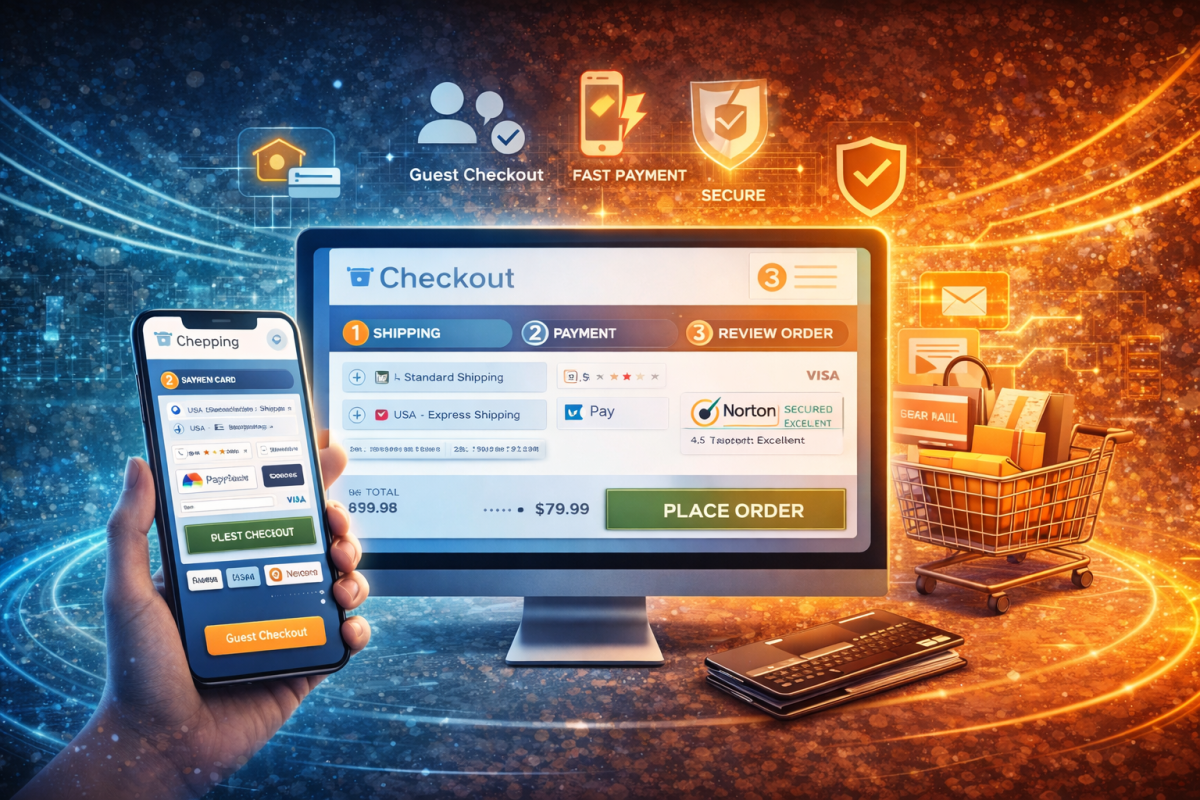
The final hurdle in e-commerce isn’t attracting traffic—it’s convincing a buyer, who has already signaled intent by adding items to their cart, to hit that final "Purchase" button. If your conversion rates are suffering, you're not alone. The average e-commerce cart abandonment rate hovers chillingly close to 70%. That means for every 10 shoppers, seven are walking away, leaving billions in potential revenue stranded. The good news? Cart abandonment is rarely a product issue; it’s a process issue. It’s a signal that your checkout flow is introducing friction, frustration, or fear. As experts in optimizing digital pathways, we at Webwhizz specialize in diagnosing and fixing these points of failure. This comprehensive guide details the five critical UX tweaks we implement to turn hesitant browsers into loyal, high-value customers. Before diving into solutions, it’s essential to understand the primary drivers of abandonment. Shoppers are highly sensitive to surprises and complexity. The top reasons consumers abandon their carts are universally related to poor User Experience (UX): | Primary Reason for Abandonment | UX Solution Focus | | :--- | :--- | | High extra costs (shipping, taxes, fees) | Transparency | | Forced account creation | Simplicity & Speed | | Security concerns or lack of trust | Credibility & Trust Signals | | Checkout process is too long/complicated | Optimization & Efficiency | | Website loaded too slowly | Technical Performance | Webwhizz’s 5 UX Tweaks That Boost E-commerce Sales Our methodology focuses on minimizing friction and maximizing clarity, converting a clunky checkout process into a smooth, intuitive transaction. Tweak 1: Eliminate Sticker Shock – Be Transparent About Costs The number one reason for abandonment is unexpected costs popping up at the last minute. Surprise shipping fees and taxes are instant deal-breakers. Actionable UX Fixes: Show Costs Early: Use geo-location to estimate shipping costs directly on the Product Detail Page (PDP) or even on the Cart Summary page, long before the user reaches the final payment stage. Offer Shipping Thresholds: Clearly advertise your free shipping threshold (e.g., "Add $15 more to qualify for free shipping"). This incentivizes higher Average Order Value (AOV) while eliminating the cost objection. Calculate Taxes Immediately: If feasible, provide a tax estimate as soon as the shopper enters their state or zip code, ensuring the number they see in the cart summary is the number they pay. Tweak 2: Simplify the Funnel – Embrace Guest Checkout Asking a first-time shopper to commit to creating an account is asking too much. Account creation introduces cognitive load and perceived effort, leading many shoppers to simply exit the site. Actionable UX Fixes: Prioritize Guest Checkout: Make "Continue as Guest" the primary, most prominent button on your checkout page. Auto-Account Creation: Allow users to complete their purchase as a guest, but subtly offer the option to save their details for next time by simply setting a password after the purchase is finalized. This captures the customer data without interrupting the flow. Minimize Required Fields: Ruthlessly audit your checkout form. Do you truly need their fax number or birth date? Only collect essential information (name, address, payment details). If you can pre-fill information based on their payment method (e.g., Apple Pay or PayPal), utilize it. Tweak 3: Build Trust with Security and Credibility Shoppers handing over credit card information need absolute reassurance that their data is safe. A lack of visible security signals breeds fear and hesitation. Actionable UX Fixes: Prominent Trust Seals: Display recognizable security badges (like Norton, McAfee, or SSL certificates) near payment fields and in the footer. Clear Privacy Policy Linking: Ensure the link to your privacy policy is easily accessible in the checkout footer, proving you take data handling seriously. Customer Reviews Integration: If you utilize platform reviews (Trustpilot, Google Reviews), display a snapshot of your high rating near the checkout buttons. Social proof at this critical stage dramatically boosts confidence. Transparent Return Policies: Clearly state your generous and hassle-free return policy directly on the product and cart pages. Knowing they can easily return an item reduces purchase risk. Tweak 4: Optimize for Speed and Mobile Responsiveness The rise of mobile shopping means your checkout must be flawless on a small screen, and lightning fast. Every second of load time costs you conversions. Actionable UX Fixes: Mobile-First Design: Ensure input fields are large, buttons are thumb-friendly, and the entire page requires minimal zooming or scrolling. Utilize Digital Wallets: Integrate one-click payment options like Apple Pay, Google Pay, and PayPal. These methods bypass manual entry, speeding up the mobile checkout process dramatically. Optimize Images and Code: Focus on page speed metrics. Compress all images and minimize unnecessary third-party scripts that bloat the checkout page, ensuring your payment gateways load instantly. Single-Page vs. Multi-Step: While some sites prefer multi-step, if you use a single-page checkout, ensure it is horizontally organized and scrolls efficiently on mobile devices, providing clear progress indicators if it's long. Tweak 5: Master Cart Persistence and Recovery Abandonment is inevitable. The strategy is to recover those lost sales efficiently. Cart persistence ensures that when a shopper returns, their items are still waiting, and recovery leverages powerful targeted messaging. Actionable UX Fixes: Implement Persistent Carts: Use cookies or local storage so that items remain in the cart for days or even weeks, even if the user closes the browser. If the user logs in on a new device, the cart should sync instantly. Strategic Exit Intent Pop-Ups: If a user moves their mouse toward the browser close button, deploy a final, non-intrusive offer—perhaps a reminder of free shipping or a small discount—to incentivize the final purchase. Abandoned Cart Email Sequences: This is the highest ROI recovery tactic. Send a series of personalized emails: Email 1 (30 minutes - 1 hour): A simple reminder that the items are waiting. Email 2 (24 hours): A message highlighting the item's scarcity or key benefits. Email 3 (48-72 hours): A final, high-value incentive, such as a slight discount or free shipping code, if necessary. About Webwhizz Services At Webwhizz, we understand that great design is not just about aesthetics—it’s about results. We specialize in identifying the subtle UX friction points that cost e-commerce businesses thousands every month. Our services focus entirely on the crucial areas of conversion rate optimization (CRO) and user experience design, implementing the exact five tweaks detailed above, tailored to your specific market and audience. We are dedicated to building high-converting, robust digital experiences that prioritize your customer's journey from product discovery to successful checkout. Want to learn more about how we implement strategic UX improvements to boost your e-commerce sales? Check out our services and contact us today. Conclusion: Turning Frustration into Funds Cart abandonment is a solvable problem rooted in clarity, trust, and speed. By implementing these five strategic UX tweaks—embracing transparency, simplifying your forms, establishing credibility, optimizing for mobile, and deploying robust recovery strategies—you dramatically decrease friction and instantly boost conversions. Don’t let your hard-won traffic evaporate at the checkout. Start treating your cart like the valuable conversion tool it is, and watch your abandoned revenue return to your bottom line.

From Brick-and-Mortar to Digital Your Essential Guide to Moving Your Business Online
The modern marketplace is no longer defined by geography; it is defined by connectivity. If you run a successful brick-and-mortar business, you already know the value of high-quality products, excellent customer service, and strong local relationships. The challenge now is translating that tangible success into a thriving, scalable digital presence. Moving your business online is not just about having a website—it is about adopting a digital-first mindset, reaching new audiences, and leveraging technology to streamline operations. This comprehensive, step-by-step guide is designed to simplify that transition, helping you navigate the complexities of digital transformation and build a robust online foundation. The Imperative of Digital Transformation In the post-pandemic era, digital presence has shifted from being a competitive advantage to a necessary survival mechanism. Consumers demand convenience, speed, and accessibility—qualities only guaranteed by a strong digital footprint. By moving online, you unlock several critical benefits: Expanded Reach: Break free from geographical limitations and access national or global customer bases. 24/7 Availability: Your store or service is always open, maximizing sales opportunities. Data-Driven Decisions: Gain invaluable insight into customer behavior, purchasing patterns, and marketing effectiveness. Operational Efficiency: Automate tasks like inventory management, customer service, and payment processing. Phase I: Strategic Planning and Digital Audit Before laying the first digital brick, you must define your purpose and map out the landscape. Assessing Your Current Position Start by looking critically at your existing business model and how it translates digitally. Identify Core Offerings: Which products or services are most viable for online sales? Can services be digitized (e.g., consultations via video, digital product downloads)? Understand Your Digital Audience: Your in-store customer might differ from your online shopper. Use existing data or initial market research to create buyer personas that reflect your target online demographic. Define Your Goals (The 3 Cs): Conversion: What specific action do you want users to take (purchase, sign up for a service, book an appointment)? Competition: Analyze what successful digital competitors are doing well, and identify gaps you can fill. Capacity: Ensure your operations (fulfillment, shipping, logistics) can handle the increased volume of online orders. Phase II: Establishing Your Online Real Estate Your website is the heart of your digital business—it must be professional, intuitive, and highly functional. This is where strategic partnership becomes crucial. Choosing the Right Platform Selecting the right Content Management System (CMS) or e-commerce platform dictates your capabilities and scalability. E-commerce Focused: Platforms like Shopify or BigCommerce are ideal for businesses primarily selling physical products, offering built-in inventory, payment, and shipping tools. Service & Content Focused: Platforms like WordPress offer greater flexibility and customization for service providers, blogs, and complex business structures. Design, Functionality, and User Experience (UX) A beautiful site means nothing if it’s slow or difficult to navigate. Your digital storefront must prioritize the user experience. Mobile-First Design: Over 60% of web traffic is mobile. Your site must look and function flawlessly on all screen sizes. Intuitive Navigation: Customers must find what they need in three clicks or less. High-Quality Visuals: Invest in professional photography and video that accurately represents your products. At Webwhizz, we specialize in transforming complex business models into seamless digital experiences. We don’t just build websites; we craft bespoke, high-performance digital homes tailored specifically to your conversion goals, ensuring robust functionality whether you are selling 10 products or 10,000. A Note on Partnership: Meet Webwhizz Successfully navigating digital migration requires expertise across multiple fields: design, development, security, and marketing. Trying to manage all these moving parts internally can be costly and inefficient. Webwhizz is a full-stack digital solutions provider dedicated to helping businesses make the leap from physical to digital successfully. We act as your complete digital partner, offering services that span the entire online journey—from initial strategic consultation and bespoke web development to continuous optimization and digital marketing execution. Learn more about About Us at Webwhizz and how we tailor our services to your unique business needs. Phase III: Ensuring Visibility and Performance A stunning website hidden on page ten of Google is useless. Visibility is achieved through rigorous optimization. Search Engine Optimization (SEO) Fundamentals SEO is the process of optimizing your website so search engines like Google understand and rank your content. Keyword Research: Identify the terms your target audience uses to find your products or services. Incorporate these naturally into your product descriptions, landing pages, and blog content. Local SEO (Critical for Brick-and-Mortar): Claim and optimize your Google Business Profile (GBP). Ensure Name, Address, and Phone number (NAP) consistency across all online directories. Technical SEO: This includes site speed optimization, secure hosting (SSL certificate), and creating a clean site architecture that search engine bots can easily crawl. Security and Compliance Trust is paramount in the digital world. Data Protection: Implement strong security protocols, especially if handling customer payment information. Legal Compliance: Ensure adherence to global data privacy regulations (e.g., GDPR, CCPA) and clearly display your Privacy Policy and Terms of Service. Phase IV: Activating the Digital Sales Channel Once your platform is stable and optimized, the focus shifts to driving qualified traffic and facilitating transactions. E-commerce and Payment Integration If you are selling goods, you need a robust, reliable checkout system. Payment Gateways: Integrate trusted services like Stripe, PayPal, or specialized merchant accounts that offer secure and diverse payment options (credit cards, digital wallets). Shipping & Logistics: Clearly define shipping costs, return policies, and fulfillment timelines. Consider integrating shipping tools that automate label generation and tracking updates. Digital Marketing Launchpad You need a multi-channel strategy to replace the foot traffic you had downtown. Content Marketing: Create valuable blog posts, videos, or guides that position your business as an industry authority and drive organic traffic. Paid Advertising (PPC): Utilize Google Ads and social media advertising (Facebook/Instagram) to target specific demographics immediately and generate early sales. Email Marketing: Capture email addresses early. Email remains one of the highest ROI marketing channels for nurturing leads and promoting repeat business. Phase V: Iteration and Scaling The digital world is dynamic. A successful launch is merely the starting line for continuous improvement. Measurement and Analysis Leverage analytics tools (like Google Analytics) to track key performance indicators (KPIs): · Which pages convert the best? · Which marketing channels bring the highest value traffic? · Where are users abandoning the shopping cart? Use this data to inform iterative improvements to design, pricing, and marketing spend. Customer Service Digitalization Ensure your digital customer service matches the quality of your in-store experience. Implement: Live Chat Support: For instant answers to common questions. Comprehensive FAQ Section: Reduces support load. Ticketing Systems: For complex issues that require follow-up. Ready to Make the Leap? Transitioning your business from brick-and-mortar to digital is a significant undertaking, but it is the most critical investment you can make in your business’s future resilience and growth. It requires careful planning, technical precision, and continuous optimization. Don't navigate this complex journey alone. Webwhizz Services provides the expertise and full-stack support necessary to ensure your digital transformation is not just a successful launch, but a foundation for sustained online excellence. Visit us at webwhizzservice.com today to schedule a consultation and take the next step toward defining your robust digital future.