In the digital world, data is the new currency—and protecting that currency is not just a technical necessity, it's the foundation of customer trust. For any business operating online, the safety of customer information is paramount. A single breach can shatter reputations, incur massive fines, and permanently erode the confidence of your user base.
If you are running an e-commerce platform, a SaaS application, or any website that handles sensitive user information, this guide is your starting line. Welcome to Security 101, where we lay out the non-negotiable steps to locking down your digital infrastructure.
At Webwhizz, our mission is to ensure your web presence is not only powerful and fast but also relentlessly secure. We believe enterprise-level security should be accessible to everyone.
The Foundation: Why Customer Trust Is Your Biggest Asset
Security isn't an item on a checklist; it's an ongoing process that defines your brand integrity. When customers submit their payment details, personal identifiable information (PII), or confidential data, they are placing enormous faith in your stewardship.
Losing that trust through negligence can be far more damaging than any operational downtime. Strong security practices are, in fact, powerful marketing tools that signal reliability and professionalism.
Phase 1: Locking Down the Perimeter (Infrastructure Security)
The first line of defense involves securing the environment in which your website operates.
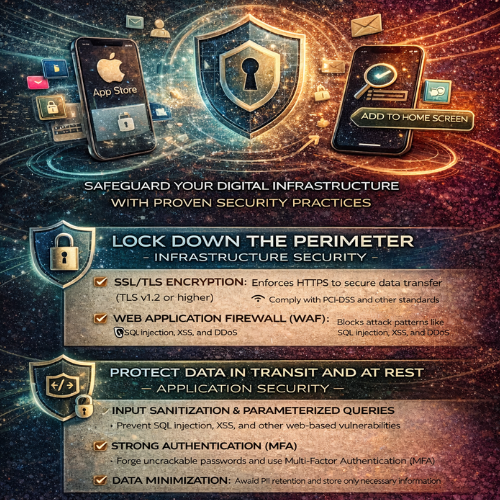
1. Mandatory SSL/TLS Encryption
This is the bare minimum requirement for any modern website, particularly those handling logins or transactions. SSL (Secure Sockets Layer) and its successor, TLS (Transport Layer Security), encrypt the data exchanged between the user’s browser and your server.
- The Visual Cue: Look for the padlock icon in the browser address bar and the https:// prefix.
- The Function: Encryption ensures that if an attacker intercepts the data (e.g., a credit card number), they only see scrambled, unusable information.
- Compliance: Many regulatory standards (like PCI-DSS for payments) require strong SSL/TLS protocols. Furthermore, Google Chrome and other browsers actively penalize non-HTTPS sites by marking them as "Not Secure."
2. Implement Robust Web Application Firewalls (WAF)
A standard network firewall protects your server from general internet traffic, but a Web Application Firewall (WAF) is designed to inspect HTTP traffic specifically. It sits between the user and your server, filtering out malicious requests before they reach your core application.
A WAF helps mitigate common threats such as:
· SQL Injection attacks (sending malicious database queries).
· Cross-Site Scripting (XSS) attacks.
· DDoS (Distributed Denial of Service) attacks that aim to overwhelm your server capacity.
3. Comprehensive and Verified Backup Strategy
No security strategy is complete without a solid recovery plan. Security breaches, hardware failures, or even human error can take your site offline. Regular, redundant, and secure backups are your ultimate insurance policy.
- Frequency: Daily backups are mandatory for sites with frequent user interaction or transaction processing.
- Redundancy: Store backups in multiple, geographically separate locations (e.g., cloud storage separate from your main server).
- Verification: Critically, regularly test your recovery process. A backup is useless if you discover during a crisis that the restore function is broken.
Phase 2: Protecting Data In Transit and At Rest (Application Security)
Infrastructure security locks the door, but application security locks the safe. This involves coding and configuring your website application itself to resist attack.
1. Input Validation and Sanitization
The vast majority of website breaches exploit unvalidated user input. Any text field, comment box, or form submission is a potential entry point for an attacker to inject malicious code.
Key defenses include:
- Validation: Ensuring the input matches the expected format (e.g., confirming a phone number field only contains numbers).
- Sanitization: Cleaning the input by removing potentially dangerous characters or scripts (like <script> tags) before saving the data to your database or displaying it to other users.
- Parameterized Queries: Using database query mechanisms that separate the SQL command from the user data, effectively blocking SQL Injection attempts.
2. Secure Authentication and Authorization
Your login mechanisms are prime targets. Making them robust is crucial for protecting user accounts.
Strong Authentication:
- Multi-Factor Authentication (MFA): Require users to provide two or more verification factors (e.g., a password plus a code sent to their phone). This is the single most effective way to prevent unauthorized access.
- Password Hashing: Never store plain-text passwords. Use strong, one-way hashing algorithms (like Argon2 or bcrypt) with salt to securely store password equivalents.
Strong Authorization:
- Principle of Least Privilege (PoLP): Users and administrative accounts should only have the minimum access rights necessary to perform their required tasks. This limits the damage an attacker can do if they compromise a low-level account.
3. Practice Data Minimization
The best way to prevent the theft of sensitive data is simply not to store it in the first place. This concept, known as data minimization, is a core tenet of GDPR and other modern privacy regulations.
- Ask Yourself: Do you really need to store the customer's birthdate, full address, or credit card number?
- Avoid PII Retention: If you are using a third-party payment gateway (like Stripe or PayPal), never store full credit card numbers on your server. Let the payment processor handle that responsibility, using secure tokens instead.
Phase 3: The Human Element and Ongoing Maintenance
Even the most secure architecture will fail if not maintained and monitored diligently.
1. Regular Software Patching and Updates
Outdated software is responsible for a huge percentage of successful attacks. Every time a new version of WordPress, Drupal, Magento, or a server component (like PHP or MySQL) is released, it almost certainly includes vital security patches.
- Stay Current: Automate minor updates and schedule major version upgrades immediately after they are stable.
- Third-Party Components: Don't forget plugins, modules, and extensions. These often contain security vulnerabilities that provide backdoors into your system.
2. Consistent Security Auditing and Monitoring
You can’t protect what you don’t measure. Security auditing means regularly scanning your site for known vulnerabilities, misconfigurations, and suspicious activity.
- Vulnerability Scanners: Use automated tools to look for known flaws.
- Log Monitoring: Pay attention to failed login attempts, unusual traffic spikes, or changes to core files—these are often early indicators of a breach attempt.

How Webwhizz Ensures Your Continuous Security
The depth and complexity of modern web security can be overwhelming, especially for business owners trying to focus on growth. That’s where the expertise of a trusted partner becomes invaluable.
At Webwhizz, we specialize in providing continuous security solutions so you don't have to become a full-time security analyst.
We handle the heavy lifting: from provisioning strong WAF services and managing complex authentication protocols to conducting proactive audits and ensuring 24/7 log monitoring. Our team stays ahead of emerging threats, guaranteeing that your infrastructure benefits from the latest patches and best practices.
About Us:
Webwhizz is dedicated to crafting secure, high-performance digital solutions. We integrate robust security protocols into every layer of your website development and maintenance lifecycle. To learn more about our managed hosting and security services, visit us at webwhizzservices.com.
Conclusion: Security Is a Journey, Not a Destination
In the rapidly evolving landscape of cyber threats, achieving "perfect security" is impossible, but achieving "resilient security" is absolutely essential. By implementing these Security 101 principles—from securing your perimeter with SSL and WAFs to protecting your application with strong validation and MFA—you dramatically reduce your risk profile and solidify customer trust.
Don't wait for a breach to make security a priority. Start today by reviewing your current infrastructure and implementing these essential safeguards. If you need expert assistance in auditing, hardening, and maintaining a bulletproof digital presence, connect with Webwhizz today. We build confidence, one secure connection at a time.